03 March 2018

Butterfly Photography Series

Butterfly Photography Series
Digital Post-Processing - Part 1 : Basic Post Processing


In the earlier Butterfly Photography 101 series, we discussed a range of subjects, from photographic equipment to composition to stalking butterflies in the field. We continue on to another aspect of digital photography - post processing. Whilst it is important to "get the photo right" out in the field, there are numerous situations where a butterfly photo needs an extra bit of work to get it "perfect".

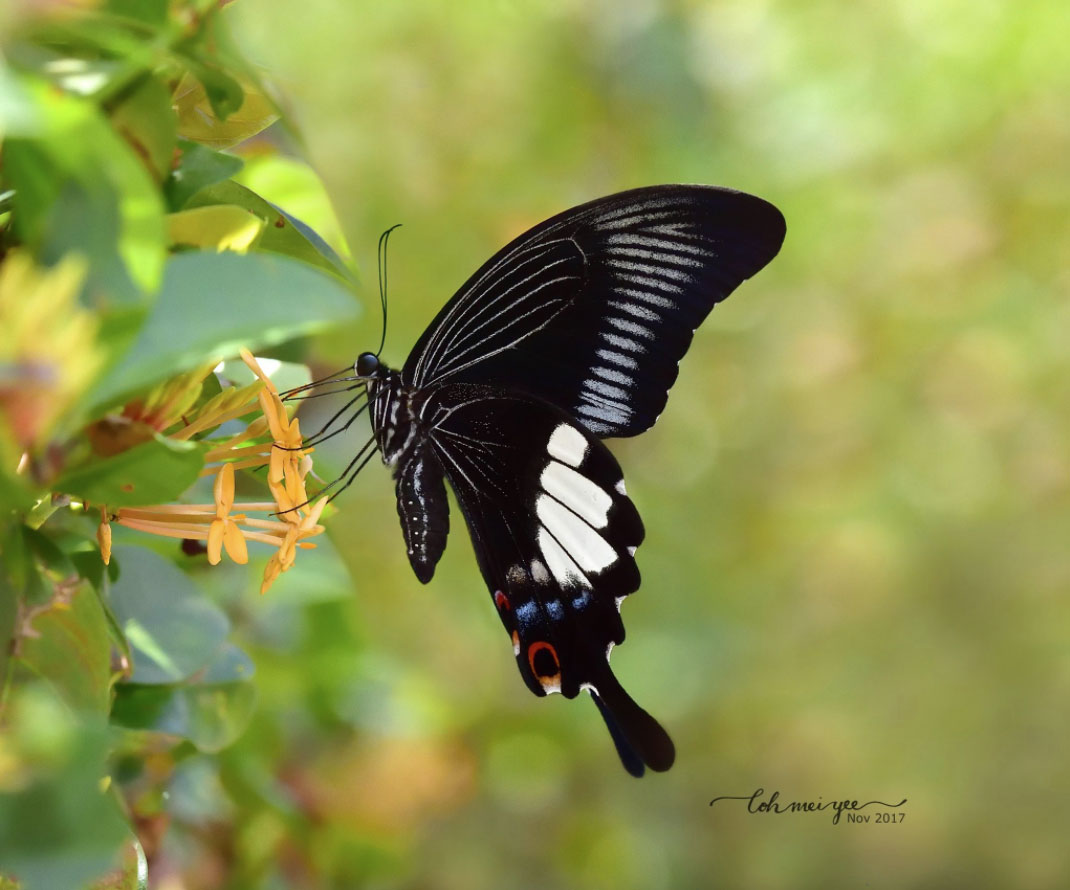


In today's world of photography, post-processing is very much a part and parcel of a photographer's arsenal of technical skills to present a photo in the best possible way. Whilst purist advocates of photography frown on any sort of manipulation of a photograph, such digital interventions are quite acceptable in many situations. The key is the extent of digital manipulation. In extreme cases, a major makeover eliminates the need to even take a photo of a butterfly out in the field!  However, this article is more about doing basic post-processing to make a photo look even better.


The majority of amateur butterfly photographers would deem some form of digital manipulation of a photo as acceptable. Unless one is an expert at using any of the sophisticated photography post-processing software like Photoshop, most of us should be quite happy just adding a bit of sharpening or increasing the contrast of a photo. It would be quite safe to assume that most of these photos end up on social media, websites and other parts of cyberspace, rather than printed out in poster-size for display.


In this new series on digital post-processing, ButterflyCircle member Loh Mei Yee shares her tips and tricks on how she enhances her butterfly photos before sharing her work online with the community. In this Part, she discusses some fundamental post-processing editing of a photo to make it look a little better. Over to Mei Yee...


I started butterfly photography in January 2017. Under the guidance of some of the best butterfly shooters in ButterflyCircle, I was able to progress very smoothly. Thank you to all the sifus! In the field, I applied the things that I’ve learned. Examples are how to approach the butterflies like I’m practising Qigong, avoid sudden movements, try to get as close to the butterflies as I could so that I can get good bokeh with shallow depth of field, etc. After that few seconds of snapping away, I’ll immediately check my shots and I will be very happy if I managed to get a few good shots, or even if there was just one good shot.


I’m sure some of us will find that the photo you see on your computer does not look as good as what you have seen from your camera screen. And you might wish that there’s something you can do to make it look better. There’s when that little photo editing magic comes in. In this mini series, I will show you some simple steps in Photoshop editing. I am by no means an expert in Photoshop, nor would I say my methods are the best, but I’m here to share with you some of the things I’ve learned through the years of using Photoshop. I hope you will find them useful!


These are the 7 free plug-ins in Nik Collection. But I will be using only 2 plug-ins, Viveza and Sharpener Pro.

Most of the post-processing is done using Nik. The Nik Collection by Google comprises seven desktop plug-ins that provide a powerful range of photo editing capabilities. Nik plug-ins can be used on Photoshop®, Lightroom®, or Aperture®. You can download it free here : The Nik Collection. I’m a long-time Photoshop user but only discovered Nik Collection last year, thanks to Uncle Bob Cheong for introducing me to this awesome plug-in, and now I’m addicted to it. It was made available for free in 2016.


Open your file in Photoshop. I’m using Nikon camera and I shoot in raw. I use a free application called Capture NX-D to open the RAW files and from there, open the files in Photoshop. You can download it here : Nikon Capture NX-D. I’ve chosen a photo of the Common Bluebottle that I shot some time in May 2017. 


The red arrow shows the use of RAW Presharpener under Sharpener Pro

Step 1
Under Sharpener Pro 3, select ‘RAW Presharpener’. Many DSLR cameras have anti-aliasing filters to prevent *moirĂ©. Anti-aliasing filters often introduce an undesired blur to a photo. The RAW Presharpener helps to remove this issue. The advantage of using the sharpening tools in Nik is that you can choose to select areas that you want to sharpen on by adding control points. In this case I’m sharpening the entire image but I prefer to do it with Nik because it will automatically create a new layer after applying the tool. You can also sharpen the image by using the Photoshop function. Go to Filter—Sharpen—Smart Sharpen.
*Moiré pattern occurs when a scene or an object that is being photographed contains repetitive details (such as lines, dots, etc) that exceed the sensor resolution.


The ‘Adaptive Sharpening’ is default at 100%, click OK. Remember to look out for noise appearing due to sharpening, because then you have gone way too far. You might want to reduce the percentage of sharpening, it’s totally up to you. Just remember to make it subtle, we don’t want any halos showing up.


A new layer is created. Your original image is at the Background layer, if you are not total pleased with what you have applied, you can delete the newly created layer and start all over again.


The red arrow shows Viveza 2.  Click to launch the plug-in

Step 2
Enhance colours with the use of ‘Viveza 2’.


Adjust the brightness and contrast to your preference and click OK.


A new layer is created. Now you will see that your photo is starting to come alive!


Step 3
Using control points in Viveza 2.
In this step, I will show you how to make use of ‘Add Control Point’ to make adjustments to selected areas.


I felt that this blue area on the wing is a little too bright so I added a control point, close up the area that you want to make adjustment to by moving the slider to the left and reduced the brightness.


To make the butterfly “pop” even more, I decided to brighten up the background and also to reduce the saturation. By reducing saturation to the background, it makes the background looks ‘duller’ and hence the emphasis is on the main subject. Again add ‘control point’ on the background and move the slider to the right to covers the entire picture.


Adjust the brightness and saturation and click OK.


Again, a new layer is created. When you are happy with the result then it’s time to move on to cropping out the unwanted areas.


Step 4
Cropping the image.
By cropping out some of the background on the right and bottom, it helps to “move” the butterfly into a better position and creates “lead room”. Select the crop tool from the tool box, select your desired aspect ratio and hit the ‘enter’ key.


Original Photo

Post-processed and cropped photo


Original photo

Post-processed photo

I hope these 4 simple steps of editing helps you to become more confident in how you process your photos. As I mentioned at the beginning of this article, there are many different ways of doing editing, we just have to explore and find the method that suits you best. In summary, I have made a short 3-minute video tutorial below, showing you how you can enhance the look of your photo in just 4 simple steps.


Text and Photos by Loh Mei Yee

24 February 2018

Seasonal Butterfly Appearances

SeasonalButterflyAppearances
Featuring the Dwarf Crow (Euploea tulliolus ledereri)


A male Dwarf Crow feeding on the flower of the Snakeweed

I was reading up on one of the "Crow" species of butterflies - The Blue Branded King Crow (Euploea eunice leucogonis) recently. This medium-sized "Crow", listed as extant in Singapore in the Butterflies of the Malay Peninsula 4th Edition, has not been seen in Singapore since the 1990's. One of the observations made in C&P4 was "It is erratic in appearance; it may be abundant in a locality for a few months and then disappear completely for a year or two before reappearing and becoming as common as before."


The closely-related Blue Branded King Crow - looks similar to the Dwarf Crow, but much larger in size.  On the upperside forewing, there is a prominent blue "brand".  This species, although recorded as extant in Singapore, has not been seen on the island for over 40 years.  

The Blue Branded King Crow is "suggestive of E. tulliolus, but is much larger." (C&P4 page 116). This related species, the Dwarf Crow (Euploea tullioulus ledereri) was re-discovered on the offshore island of Pulau Ubin back in 2002. Similar in appearance to the Blue Branded King Crow, it appears to display the seasonality characteristics as observed in the book.


A Dwarf Crow feeding on the flower of the Spanish Needle

The seasonal appearance and re-appearance (but not necessarily annually) of the Dwarf Crow on Pulau Ubin, where it is most regularly seen, is of noteworthy mention. After it was first observed and recorded in the Singapore Checklist, its appearance on Pulau Ubin has been erratic. There were some years where the species completely disappeared from the island, only to re-appear many months later and become common again.


A Dwarf Crow feeding on the flower of the Bandicoot Berry


Recently, in the later months of 2017 and in January and February 2018, the Dwarf Crow has become common again on Pulau Ubin, and particularly at the Butterfly Hill, where it is frequently spotted. On one outing, I counted at least 6-8 individuals feeding at the flowering plants - particularly on the flowers of the Spanish Needle (Bidens alba). The species also feeds on several other nectaring plants and does not appear to be too fussy or have fixed preferences on where they get their nectar from.


After feeding in the morning hours, Dwarf Crows tend to hide in the forest shade, perched on leaves, branches or twigs to rest in the afternoon

In the later hours of the day, after noon and having done all their feeding, they will take shelter in the shaded areas to rest. They will stay still on their perches, unless disturbed by movement, whereby they will take off and look for another perch to rest. This behaviour is quite typical of several Danainae species.


A female Dwarf Crow showing the upperside of its wings

The Dwarf Crow is the smallest member of the genus Euploea. The wings are reddish-brown with the apical portion of the upperside of the forewing a deep blue. There are a number of bluish or whitish discal and sub-marginal spots on the forewing. The hindwing is unmarked in the male and the tornal area is lighter. In the female, the hindwing has a series of submarginal diffused whitish spots.


The male Dwarf Crow's forewing dorsal margin is bowed or curved, whilst the female's dorsal margin is straight

The dorsal margin of the male is bowed or curved whilst it is straight in the female. On the underside, both sexes are almost indistinguishable with the usual whitish marginal and submarginal spots on both wings. The underside of both wings is a dull matt brown.


The Dwarf Crow flies in an unhurried manner, moving from flower to flower to feed. It then clutches on the flower head whilst its proboscis probes deep into the flower to gain access to the nectar within. Like all the related species in the Euploea genus, the Dwarf Crow is also believed to be distasteful to birds.


A Dwarf Crow puddling at a sandy footpath

Occasionally, the Dwarf Crow can be seen puddling at damp footpaths and muddy areas that have been tainted with animal urine or other minerals. It will come back to its favourite spot again and again even after being disturbed.


A Dwarf Crow feeding on the flowers of the Indian Heliotrope

The caterpillar has been described as dark violet brown with faint pale and dark transverse stripes along its body and the dorsal stripes are yellowish white. The filaments are violet brown. We have not been able to find the early stages of this species in Singapore thus far. The caterpillar host plants are believed to be Mikania cordata and Malaisia scandens. (Ref : C&P4 and Fleming)


A Dwarf Crow feeding at the flowers of the Prickly Lantana

Like its close cousin, the Blue Banded King Crow, the erratic appearance of the Dwarf Crow is still a mystery. Where does the species disappear to, in the years when it is absent from Pulau Ubin? Does this have something to do with the abundance (or lack of) its caterpillar host plants? When it reappears, why does it become common again? What causes it to disappear again?


These are questions that have yet to be answered, as we continue to observe the behaviour of the Dwarf Crow. In the meantime, for the photographers who are keen to record this species for their digital collection, do visit Pulau Ubin to get your fill of the Dwarf Crow before it disappears again. Who knows how many years will pass, before it re-appears and becomes common again?

Text by Khew SK : Photos by Bob Cheong, David Ho, Khew SK, Loh MY and Jonathan Soong.

17 February 2018

Butterfly of the Month - February 2018

Butterfly of the Month - February 2018
The Green Baron (Euthalia adonia pinwilli)


A male Green Baron feeding on the ripened fruit of the Singapore Rhododendron

We cross into the Chinese Zodiac sign of the Year of the (Earth) Dog as Chinese communities all around the world celebrate the Lunar New Year on 16 February. The dog is the 11th animal out of the 12 selected animals that made it to the Jade Emperor's Great Race. The most defining characteristic of someone born in the year of the dog is their loyalty. They will never abandon their friends, family or work. Honest and just, they are popular in social circles. They are also good at helping others find and fix their bad habits.


Some geomancers predict that 2018 is going to be a tumultuous year for global events. A few predictions even pointed to some serious natural disasters in parts of the world. Then again, soothsayer predictions have always been here to stay, and to each his own whether to believe and take action to avoid 'bad luck' or to just ignore any form of fortune-telling, and live life to the fullest.


In the US, another senseless shooting took the lives of 17 innocent people at the Stoneman Douglas High School in Florida. The shooter, a former student who had been expelled for bad behaviour carried an AR-15 semiautomatic rifle with multiple magazines and was probably intent on taking lives when he went on his shooting spree that morning. As long as the US lawmakers remain adamant about "doing the right thing" as far as guns are concerned, such incidents will happen over and over again.


Over here in Singapore, we can only be thankful that the government has made the possession of firearms illegal and that such shooting incidents are highly unlikely to be caused by a civilian who has relatively easy access to assault rifles. It is hoped that governments of countries with strict gun control laws will continue to impose such laws so that what happened (and will continue to happen in the US), can be avoided in our respective homelands.


As the Chinese New Year celebrations continue for the next 15 days, Singaporeans wait with bated breaths for the announcement of the 2018 Budget. Rumours are rife that taxes, particularly the goods and services tax, will be raised. This usually translates into a higher cost of living as the GST affects practically every aspect of our daily life. Coincidentally, someone once said 'nothing is certain but death and taxes'.


A female Green Baron feeding on the flowers of the Javanese Ixora

Whilst looking for a species that features some auspicious red colour befitting of the Chinese New Year season, I selected one with some attractive red accents in its wings. Hence we feature the Green Baron (Euthalia adonia pinwilli) as February 2018's Butterfly of the Month. The attractive red spots, particularly on the underside of the wings of the male, gives the Green Baron a distinctive look.


A newly-eclosed male Green Baron clinging onto its pupal case

The Green Baron is a medium sized butterfly with an average wingspan of 55-65 mm. It is moderately common and regularly observed in urban parks and gardens, although it frequents the forested nature reserves as well. The main reason why the Green Baron is widely distributed, is because it caterpillar host plant, the parasitic plant, Malayan Mistletoe (Dendrophthoe pentandra),  can be found growing quite commonly on many other plants in urban parks and gardens.


The butterfly has a robust body like other species of the Euthalia genus (or collectively known by their common English name of "Barons").  Both the male and female of this species are strong flyers and skittish. They will fly rapidly away from any intrusion into their territory and head high up to the treetops, out of reach of any predators.


Male Green Barons feeding on Singapore Rhododendron fruit and Javanese Ixora flower

The male Green Baron is dark green on the upperside with a lighter green tornal area of the hindwing. The forewing has prominent white subapical spots and post-discal spots. The underside features the same subapical and post-discal spots but has a number of crimson spots at the cell area of the forewing and across the hindwing.


Female Green Barons feeding on Singapore Rhododendron fruit and Javanese Ixora flower

The female Green Baron has a broad white band across both wings with the veins blackened prominently. The tornal area of the hindwing on the upperside is an iridescent green with large black marginal spots and crimson spots on the tornal and apical area. The underside features large red cell spots on the forewing but fewer spots compared to the male.


Both the male and female are regularly observed to feed on rotting fruits. They like the ripened fruits of the Singapore Rhododendron (Melastoma malabathricum), although they have been seen on other types of flowering plants like Ixora and Lantana. They are extremely skittish if they are not feeding and difficult to approach without scaring them off.


The Green Baron has been successfully bred on the parasitic plant, Malayan Mistletoe (Dendrophthoe pentandra), a host plant that it shares with the Painted Jezebel, Peacock Royal and Great Imperial.

We would like to take this opportunity to wish all our Chinese readers a Happy and Prosperous Lunar New Year!

GONG XI FA CAI!!!

Text by Khew SK : Photos by Foo JL, Federick Ho, Huang CJ, Khew SK, Koh CH, Nelson Ong, Tan BJ and Horace Tan.